We have collected the problems that come up most in 3D printing troubleshooting guides and books – and that we see most often in our service. Each has the same layout: what it looks like, where it comes from and where to start fixing it.
Filament manufacturer's guidance comes first. Every manufacturer has its own formulations and publishes its own parameters – nozzle, bed and chamber temperature, drying, cooling. Even the same material (e.g. PETG) from two brands may need different settings. Treat the values in this guide as a starting point: check the technical data sheet (TDS) and the spool label first, and if something is missing, ask the filament manufacturer for guidance.
Rule number one: change one thing at a time and write down what you changed. Start with dry filament and a calibrated profile – that removes half the problems on this list.
1. The print does not stick to the bed
Symptom: The first layer peels off, drags behind the nozzle or the whole print comes loose mid-print.
Most common causes: grease on the plate, Z offset too high, bed too cold, first layer too fast.
What to do: wash the plate with soapy water or IPA, correct the Z offset, raise the bed temperature, slow the first layer to 30–50 mm/s.
2. Corners lifting (warping)
Symptom: Corners of large, flat parts lift as the print goes on.
Most common causes: material shrinking as it cools – especially ABS, ASA, PA; draughts, no enclosure.
What to do: a closed, heated enclosure, higher bed temperature, brim, less cooling, rounded corners in the model.
3. Under-extrusion
Symptom: Thin, broken lines, holes in walls, weak prints.
Most common causes: flow too low, max volumetric flow exceeded, temperature too low, partly clogged nozzle, wrong filament diameter in the profile.
What to do: flow and max volumetric speed calibration, +5–10 °C, clean the nozzle, check 1.75 mm diameter in the profile.
4. Over-extrusion
Symptom: Uneven, “overloaded” surfaces, ridges, fits that are too tight.
Most common causes: flow or extruder multiplier too high, wrong rotation_distance / e-steps.
What to do: flow calibration in [r]evo Slicer; if every filament is affected – calibrate the extruder.
5. Strings between parts (stringing)
Symptom: Thin “cobwebs” between towers and parts of the model.
Most common causes: wet filament, temperature too high, too little retraction, long travel moves.
What to do: drying, −5 °C, retraction test, avoid travel over empty space in the slicer.
6. Clogged nozzle
Symptom: Filament does not come out or comes out as a thin, uneven thread; the extruder clicks.
Most common causes: contamination, material carbonising after sitting hot too long, too much retraction, heat creeping up to the heatsink (heat creep).
What to do: cold pull, replace the nozzle, check the hotend fan, less retraction.
7. No extrusion at the start
Symptom: The first centimetres of the line are empty, the skirt does not start straight away.
Most common causes: material oozing during heating, too short a purge line, retraction at the end of the previous print.
What to do: a purge line in PRINT_START, a skirt, heat the nozzle only after levelling.
8. Extrusion stops mid-print
Symptom: The print goes well, then the nozzle “prints air”.
Most common causes: tangled spool, filament chewed by the extruder gear, heat creep, clog.
What to do: check the spool and filament path, clean the extruder gears, hotend fan, enclosure temperature.
9. Extruder grinding the filament
Symptom: Grooves are visible on the filament, the extruder slips or clicks.
Most common causes: too much or too little tension, resistance in the nozzle (temperature too low, printing too fast), clog.
What to do: set the extruder tension, raise the temperature or reduce speed, clean the gears.
10. Layer shift
Symptom: Part of the print is shifted in X or Y, like a “step”.
Most common causes: loose belt or pulley, toolhead colliding with the print, motor current too low, accelerations too high.
What to do: tighten belts and pulley screws, check the rails, lower accelerations, enable Z-hop for prints with curling edges.
11. Delamination
Symptom: Layers crack or split when bent.
Most common causes: temperature too low, too much cooling, layer too tall for the nozzle, wet material.
What to do: higher temperature, less cooling, layer height up to about 75% of the nozzle diameter, drying.
12. Ripples at edges (ringing, ghosting)
Symptom: A repeating “echo” on the wall after corners and holes.
Most common causes: frame vibration on fast direction changes.
What to do: input shaper (Klipper), a stiffer frame and tightened screws, lower accelerations.
13. Holes in the top layer (pillowing)
Symptom: Gaps or “pillows” over the infill on the top surface.
Most common causes: too few top layers, sparse infill, weak cooling, under-extrusion.
What to do: 4–6 top layers, denser infill, more cooling on top, flow calibration.
14. Overheating small features
Symptom: Small details and tips melt, deform and lose sharpness.
Most common causes: the layer has no time to cool before the next one.
What to do: minimum layer time, stronger cooling, print several copies at once.
15. Zits, blobs and a visible seam
Symptom: Lumps on the walls or a clear vertical seam line.
Most common causes: oozing at layer changes, wrong pressure advance, random seam position.
What to do: pressure advance calibration, seam on an edge or at the back of the model, wipe/coasting.
16. Elephant’s foot
Symptom: The bottom layers spread wider than the rest of the print.
Most common causes: first layer set too low, bed too hot, the weight of the print.
What to do: correct the Z offset, lower the bed temperature, “elephant foot” compensation in the slicer.
17. Horizontal bands on walls (banding)
Symptom: Regular horizontal lines along the whole height of the print.
Most common causes: play or a bent Z lead screw, uneven flow, temperature fluctuations.
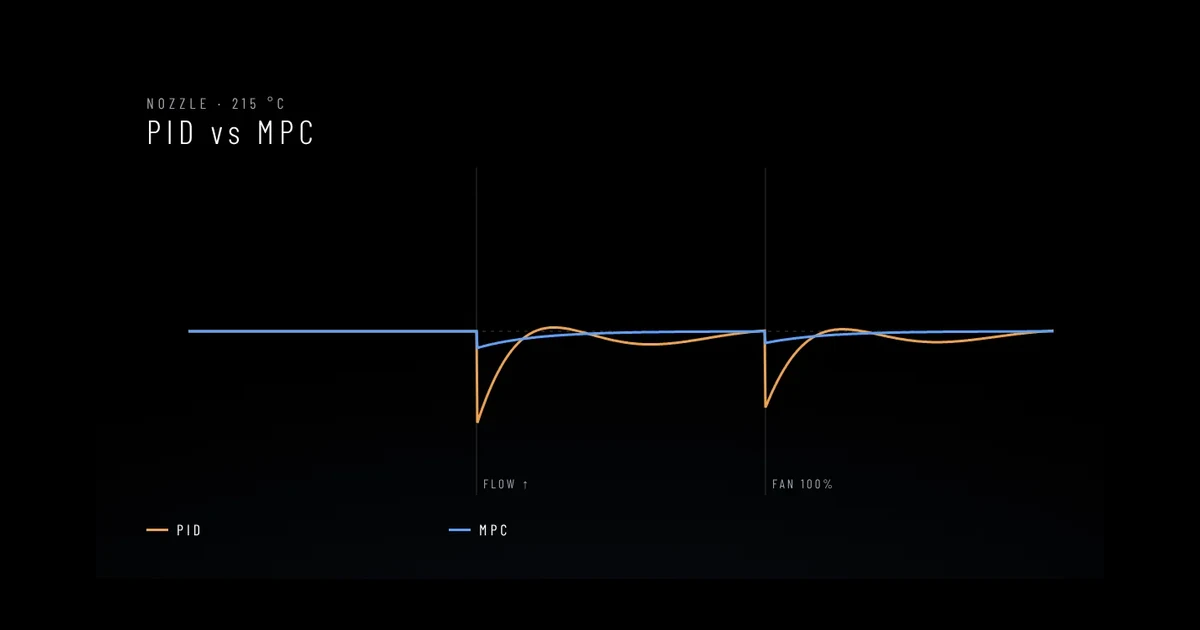
What to do: check the Z screws and guidance, temperature stability (PID), layer height matched to the motor step.
18. Weak bridges and overhangs
Symptom: Bridges sag, overhangs are ragged underneath.
Most common causes: too little cooling, temperature too high, bridges printed too fast.
What to do: more cooling on bridges, lower temperature, slower bridges, supports from about 45–50°.
19. Ugly surface above supports
Symptom: The underside of the part above supports is ragged or fused to the support.
Most common causes: wrong support-to-model distance (Z distance), no interface layer.
What to do: match the support Z distance to the layer height, use a support interface, consider tree supports.
20. Dimensions do not match the model
Symptom: Holes are too small, parts do not fit together.
Most common causes: over-extrusion, material shrinkage, uncalibrated extruder.
What to do: flow calibration, hole and shrinkage compensation in the slicer, a test cube and hole print.
Before you blame the printer: model and slicer
Some faults appear before the machine even moves.
- Model geometry – walls thinner than two line widths, holes in the mesh, flipped normals. Check the model in the slicer (mesh repair) and thicken features below about 0.8 mm.
- Slicer settings – a wrong filament or printer profile is the most common cause of “sudden” problems. Pick the right profile before slicing and change one thing at a time.
- Too many supports – they are hard to remove and ruin the surface. Set the overhang threshold to about 45–50°, supports from the bed only or tree supports, and orient the model to need as few as possible.
When that is not enough
If the problem affects different, proven filaments, you hear unusual noises or heating errors appear, it is usually a machine fault, not settings. See the article on fault diagnosis.
The problem persists despite correct settings? Contact us – describe the symptoms and attach photos.