
16. Machine test and self-diagnostics
Full machine test
Menu → More → Machine test → START TEST. It takes 15–25 minutes. Run it after installation, after transport, after replacing parts and when prints suddenly go bad. Remove prints and load filament.
- Electronics link – the mainboard and toolhead respond.
- Thermistors – temperature readings are plausible.
- Motors – each motor twitches 10 times; you confirm only that one moved.
- Belt drive (Belt) – the belt moves and returns.
- Endstops / homing – endstops and axis homing.
- Axis move – each axis moves in the right direction by the right distance.
- Gantry leveling, probe repeatability.
- Nozzle / bed heating – nozzle to 200°C and belt/bed to 60°C.
- Fans, extrude, filament sensor, lights, touchscreen.
You answer questions with WORKS or PROBLEM. For endstops, hold the endstop with a finger and tap CHECK. Heating can be skipped – SKIP: the step gets a yellow flag but does not fail the test. “Problem” is not a failure, just information for service. You can stop the test at any time (ABORT) – the machine turns heating off. The result goes to Revotech.
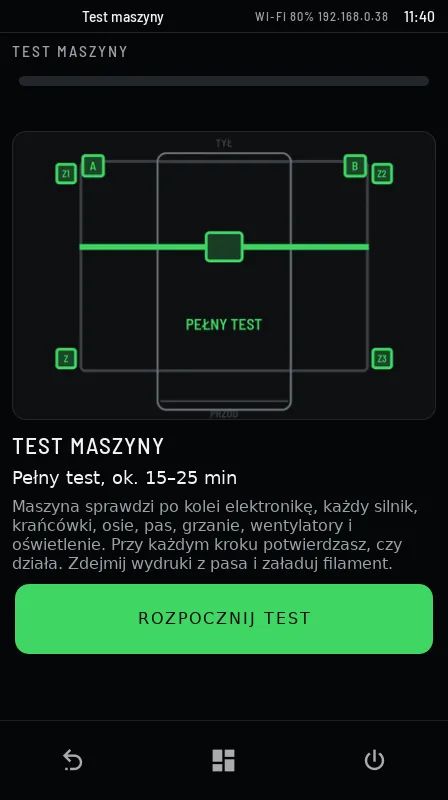
Each test step shows a drawing of what the machine checks. Examples:
Daily self-diagnostics
Once a day, when the machine is not printing, Revo OS runs a short check without moving the axes: motor drivers, communication with the boards, temperature sensor noise, heating rate (compared with previous days), fans and the control computer. Result: OK, ATTENTION (plan a service) or NEEDS SERVICE (report a problem). It is shown in About system and in Revo Panel → Service → SYSTEM.
17. Remote service
Revotech service works remotely. When we need access, the screen shows the request Revotech requests remote service (camera and screen view plus service commands for 30 min). You answer ALLOW or DECLINE – without your consent we have no access. During the session a red bar is shown on the screen; tapping it ends the session immediately. Every command is digitally signed and written to the machine log.
18. Updates
Revo OS updates come only from Revotech servers – first to our test machines, then to customers. The machine installs them when it is not printing: the screen shows Revo OS update …: The machine will be unavailable for about 2–5 min. Do not switch off the power. Update commands are signed and verified. Version history: revo3d.pl/revo-os.
20. Commands (G-code / macros)
| Command | Action |
|---|---|
PRINT_START BED= EXTRUDER= CHAMBER= MATERIAL= | Print preparation (heating, gantry leveling, bed mesh). Called from the Orca profile. |
PRINT_END | End of print: retraction, heaters off, toolhead parked. |
REVO_CHECK_NOZZLE NOZZLE=0.4 | Nozzle check before printing (in the start G-code). |
REVO_SET_NOZZLE | Stores the installed nozzle (the screen does this for you). |
LOAD_FILAMENT / UNLOAD_FILAMENT | Load / unload filament (nozzle at least 180°C). |
REVO_SELFTEST | Full machine test. |
REVO_SERIA_PRZERWA | Between queued prints: the Belt ejects the print, a rigid bed waits for confirmation. |
CLEAR_BELT / CLEAR_BELT_200 | Belt: moves the belt by 100 / 500 mm. |
REVO_POZYCJA_SERWISOWA | Toolhead to the nozzle change position. |
PAUSE / RESUME / CANCEL_PRINT | Pause, resume, cancel the print. |
M600 | Filament change during a print (pause). |
G28, QUAD_GANTRY_LEVEL, BED_MESH_CALIBRATE | Homing, gantry leveling, bed mesh. |
MPC_CALIBRATE HEATER=extruder | Heater model calibration (service). |
SHAPER_CALIBRATE, PROBE_ACCURACY | Input shaper, probe repeatability (service). |
22. Data and privacy
- Always: machine state, working hours, system version, self-diagnostics result, maintenance.
- With consent: error notifications, work statistics, part counters, e-mail reminders. Statistics history is kept on the machine and, if you consent later, is sent to Revotech in full.
- Only at your request: Report a problem requests (with log and photo), remote service.